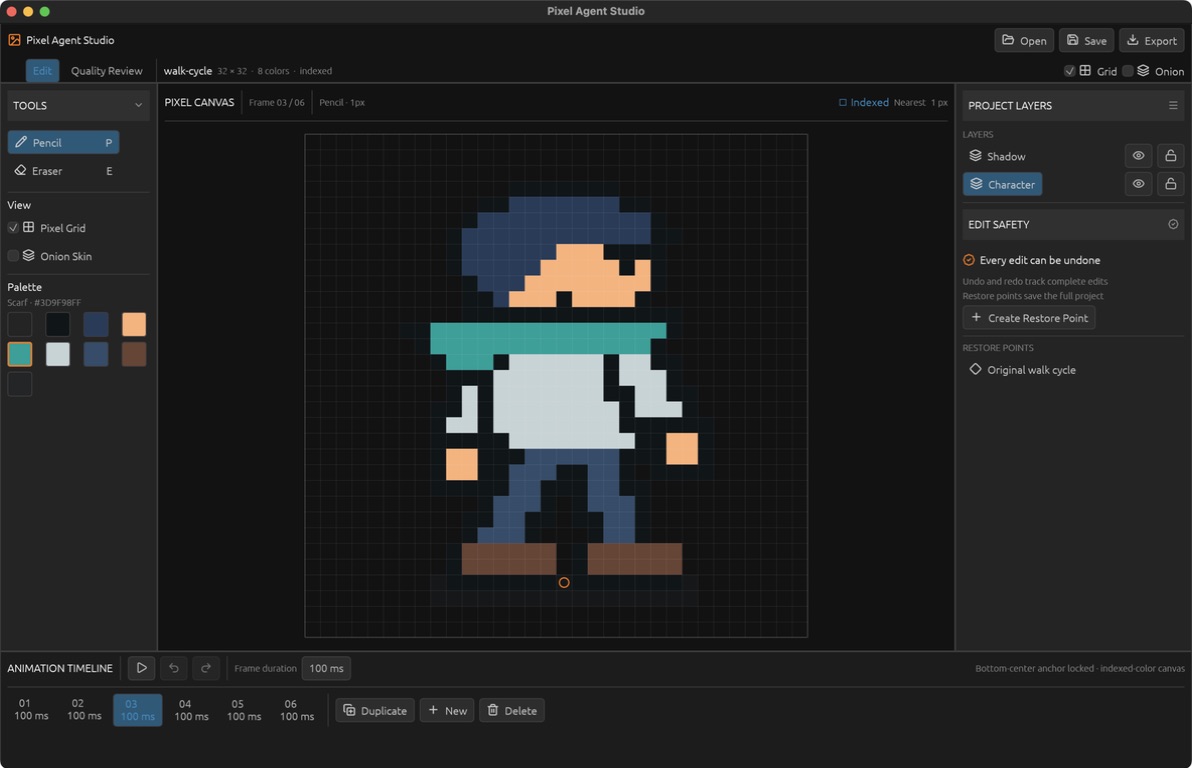
Pixel art looks simple because its final form is small. The software behind it is not. A useful editor has to preserve exact color indices, composite layers, manage animation timing, maintain reversible history, import and export several formats, and remain responsive while every pixel is enlarged enough to inspect.
Pixel Agent Studio adds another constraint: the document must be controllable by both a person and a language model without giving either one a private or lossy representation of the artwork. The native interface, command-line client, and Model Context Protocol server therefore operate on the same project model and the same deterministic command engine.
This article describes how the application was scoped, developed, compiled, packaged, and tested. It also explains the architectural decisions that make direct LLM control possible without asking an image generator to imitate pixel art.
The premise: pixels as data, not generated imagery
The central decision was to treat artwork as a small, indexed document. A cel is a flat array of palette indices. A project records its canvas dimensions, named palette, ordered layers, animation frames, anchor, active editing state, and checkpoints.
That decision creates a useful invariant: every visible pixel has an exact source. There is no probabilistic image synthesis step, no hidden raster transformation, and no ambiguity about which command changed the document. A human pencil stroke and an MCP-issued pixel run eventually pass through the same validator.
The editor targets canvases from 16×16 to 64×64 pixels and palettes of up to 32 entries. Palette index zero is reserved for transparency. Those limits are deliberately narrow. They keep the data compact, make complete document snapshots affordable, and enforce the constraints associated with sprite work rather than general-purpose painting.
The application is not an image generator with a pixel-art filter. It is an indexed-pixel system whose entire state can be inspected, reproduced, and audited.
Requirements that shaped the architecture
The first implementation pass established a small set of non-negotiable properties:
- Human and agent edits must use the same operations.
- Invalid states must be rejected before they reach the document.
- A failed command batch must leave the project untouched.
- Undo, redo, and named restore points must preserve exact pixel data.
- Saved projects must remain readable JSON rather than an opaque binary format.
- Rendering and export must derive from the indexed source, never from a preview canvas.
- The automation interface must return exact data and rendered PNGs for review.
- The native application must remain a normal, self-contained macOS binary.
These requirements led to a layered design rather than a GUI-centric one:
| Layer | Responsibility |
|---|---|
| Project model | Serializable palette, layer, frame, cel, anchor, and checkpoint data |
| Command engine | Validation and immutable state transitions |
| Store | Transactions, gestures, undo, redo, and restore points |
| Persistence | JSON validation and run-length cel encoding |
| Render and export | Layer compositing, PNG, GIF, metadata, and Godot output |
| Quality audit | Deterministic structural and animation checks |
| CLI | Scriptable access to the native engine |
| MCP adapter | Typed language-model tools over standard input/output |
| Native UI | Direct manipulation, playback, review, and file workflows |
The important boundary is beneath the interface. The UI is a client of the document engine, not the owner of it.
The Rust project model
The core data structures live in native/src/model.rs and derive Serde serialization. A frame contains a duration and a map of layer IDs to cels. Each cel is a Vec<u8> whose length must equal width × height; each byte is an index into the project palette.
Conceptually, the model looks like this:
pub struct Project {
    pub version: u8,
    pub name: String,
    pub width: u32,
    pub height: u32,
    pub palette: Vec<PaletteColor>,
    pub layers: Vec<Layer>,
    pub frames: Vec<Frame>,
    pub active_frame_id: String,
    pub active_layer_id: String,
    pub anchor: Anchor,
    pub checkpoints: Vec<Checkpoint>,
}

pub struct Frame {
    pub id: String,
    pub duration_ms: u32,
    pub cels: HashMap<String, Vec<u8>>,
}
This representation is intentionally ordinary. It can be cloned, compared, serialized, validated, and passed between subsystems without conversion into an interface-specific structure. The project also carries a version number so future migrations can be explicit.
Checkpoints store a ProjectSnapshot. A snapshot includes creative state but not the checkpoint list itself, avoiding recursive snapshots. When restored, the current checkpoint history is reattached.
Deterministic edits through a command engine
Every mutation is represented by a tagged Command enum. Commands cover pixel runs, rectangular fills, region moves, frame creation and removal, animation duration, anchors, palette changes, active selections, and layer visibility or locking.
The JSON form is deliberately plain:
{
  "type": "fill-region",
  "frameId": "frame-1",
  "layerId": "art",
  "x": 8,
  "y": 8,
  "width": 8,
  "height": 8,
  "color": 9
}
command::apply receives an immutable project reference, clones it, validates the requested operation, applies the change to the clone, and returns the next project. Validation occurs before any state is published. It checks bounds, frame and layer identity, locked layers, palette indices, dimensions, duration limits, unique IDs, and transparency rules.
This copy-and-return approach trades some memory for a very clear correctness model. At a maximum of 64×64 pixels and a small number of frames and layers, the cost remains predictable. The benefit is that callers never observe a partially applied operation.
Region moves illustrate the approach. The engine validates the source rectangle, clones the cel, clears the original region, and copies pixels from the preserved source into in-bounds destination coordinates. Overlapping moves therefore cannot destroy data while they are still being evaluated.
Transactions, gestures, and history
The Store wraps the current project with past and future stacks. A normal command creates one undo step. A transaction runs a complete command list against a temporary state and publishes it only when every command succeeds. This is the primitive used for atomic agent edits.
Pointer gestures require different history semantics. A pencil drag may produce dozens of short pixel-run commands, but pressing Undo should remove the stroke as one action. begin_gesture captures the starting project, dispatch_gesture updates the live state without pushing history, and end_gesture records the original snapshot only when something changed.
Named checkpoints provide a second level of recovery. They are persisted with the project and can represent stages such as reference import, key poses, motion, cleanup, consistency review, or final output. Restoring a checkpoint is itself undoable.
Navigation commands such as changing the active frame or layer do not pollute creative history. That small distinction makes undo behave like an art tool rather than a generic state machine.
Persistence and validation
Projects are saved as readable JSON. Raw cels would make that JSON unnecessarily large, so persistence applies simple run-length encoding. A sequence such as [0, 0, 0, 4, 4] becomes [[0, 3], [4, 2]]. Loading reverses the encoding and then validates the entire project, including snapshots stored inside checkpoints.
The validator enforces:
- project format version 1;
- dimensions between 16 and 64 pixels;
- one to 32 named palette entries;
- transparency only at palette index zero;
- at least one layer and frame;
- unique layer and frame IDs;
- valid active frame and layer references;
- layer opacity between zero and one;
- frame durations between 16 and 1,000 milliseconds;
- correctly sized cels containing only valid palette indices; and
- an anchor inside the canvas.
Validation runs on both save and load. A malformed document therefore cannot silently become the editor's current state.
Rendering indexed layers
Rendering starts from the indexed source. For each visible layer, the renderer reads the active frame's cel, resolves non-zero palette indices to RGBA values, applies layer opacity, and composites the result with standard source-over alpha.
Two render paths are exposed. indices flattens visible layers while preserving palette indices, which is useful for structural analysis. frame_rgba produces the full RGBA buffer used by PNG previews, GIF export, and the interface.
The preview is never the source of truth. Zooming the canvas or drawing an interface grid cannot alter exported pixels because export calls the renderer directly from the project.
Exporting an animation bundle
The export module creates four production files:
- a horizontal PNG spritesheet;
- a looping GIF that preserves per-frame duration;
- JSON metadata with frame rectangles, timing, canvas size, and anchor; and
- a Godot 4 import script that builds a
SpriteFramesresource from the spritesheet.
Each frame occupies a fixed-width region of the spritesheet. That makes the accompanying metadata and Godot atlas regions deterministic. The Godot script loads the PNG, creates one AtlasTexture per frame, applies frame durations in seconds, and saves a .tres resource.
PNG reference import performs the reverse transition into indexed data. It accepts images between 16×16 and 64×64 pixels, treats alpha below 128 as transparent, discovers unique opaque colors, rejects references with more than 31 opaque colors, creates a first frame, and records an initial checkpoint.
Quality gates for sprite animation
The audit system does not attempt to judge whether artwork is beautiful. It checks measurable conditions that commonly reveal broken sprites or inconsistent loops:
- dimensions remain within the supported range;
- every cel matches the canvas and palette;
- the palette respects its transparency contract;
- an animation has two to 24 frames with valid timing;
- occupied-pixel count varies by no more than 35 percent;
- the anchor is locked and the bottom edge drifts by no more than three pixels; and
- the centres of the first and last frames are within three pixels.
These checks are inexpensive and deterministic. They can run in the Quality Review workspace, from the CLI, or through MCP and always return the same result for the same project.
Building the native interface with eframe
The desktop interface uses eframe and egui. This was a practical match for the application: both are Rust-native, compile into the same executable as the engine, and suit a tool made of panels, inspectors, grids, timelines, and immediate visual feedback.
The application presents two workspaces. Edit mode prioritizes tools, palette, layer controls, a magnified canvas, and the animation timeline. Quality Review surfaces audit results and recovery actions without hiding the document. Lucide icons provide a consistent symbol set, while direct pixel interaction remains the dominant operation.
The canvas converts pointer coordinates into integer pixel coordinates and emits gapless line points for dragged strokes. Onion skinning and playback are display concerns; they do not mutate the underlying cels. File operations include PNG reference import, JSON open and save, bundle export, and Save/Discard/Cancel protection when replacing a dirty document or quitting.
Because egui is immediate-mode, the interface is redrawn from the current store on each frame. There is no second UI state tree that can drift away from the project.
One executable, two entry points
native/src/main.rs first checks for a command-line operation. Commands such as new, inspect, apply, checkpoint, render, audit, and export execute without opening a window. With no CLI command—or with gui—the same executable starts the desktop application.
This arrangement prevents automation from becoming a separate implementation. The CLI imports the same Rust modules as the GUI and reads the same validated project files.
The Cargo package now exposes a gui feature:
[features]
default = ["gui"]
gui = ["dep:eframe", "dep:lucide-icons", "dep:rfd"]
Normal builds include the full interface. Linux CI uses --no-default-features to compile and test the portable document engine and CLI without pulling in a windowing backend. The resulting headless binary is sufficient for the MCP integration test.
The MCP adapter
The MCP server is a small TypeScript process in mcp/server.ts. It uses the official Model Context Protocol SDK, Zod schemas, and a standard-input/output transport. The adapter does not reimplement project logic. It launches the compiled Rust executable for each operation and parses its JSON output.
The server exposes seven capabilities:
| MCP tool | Native operation |
|---|---|
create_pixel_project | Create and save a blank indexed project |
inspect_pixel_project | Read editable project structure |
apply_pixel_commands | Apply a validated atomic command batch |
checkpoint_pixel_project | Save a named restore point |
render_pixel_frame | Return an exact PNG preview |
audit_pixel_project | Run fixed quality gates |
export_pixel_project | Produce the complete asset bundle |
Zod constrains the tool inputs before Rust sees them. The native engine remains the final authority. For command batches, the adapter writes a temporary JSON file and passes it to the CLI; for rendered frames it returns both a text block and base64-encoded image/png content.
An LLM can therefore work in a review loop: inspect the indexed document, apply exact commands, render a frame, examine the result, audit consistency, and either continue or restore a checkpoint. The model is controlling an editor, not asking another model to draw.
Compiling the application
The repository contains two build environments: Rust for the application and Node.js for the MCP adapter.
The native prerequisites are a current stable Rust toolchain with Cargo. On macOS, the Xcode Command Line Tools provide the system linker and frameworks. The MCP side uses Node.js 22 or newer and npm.
Clone the repository and compile a development build:
git clone [email protected]:cosineFox/pixel-agent-studio.git
cd pixel-agent-studio/native
cargo run
Cargo resolves the versions recorded in Cargo.lock, compiles the Rust dependencies, builds the project library, links the binary, and starts the GUI because the gui feature is enabled by default.
For an optimized binary:
cargo build --release --lockedThe release profile enables thin link-time optimization and strips symbols:
[profile.release]
lto = "thin"
strip = true
The compiled executable is written to:
native/target/release/pixel-agent-studioFor a CLI-only build, useful on servers and Linux CI runners:
cargo build --release --locked --no-default-featuresThe no-GUI binary accepts document commands but returns a clear error when started without one.
Creating the macOS application bundle
A macOS application is a directory with a conventional structure. Pixel Agent Studio places the release executable, property list, and compiled icon into that structure:
Pixel Agent Studio.app/
└── Contents/
    ├── Info.plist
    ├── MacOS/
    │   └── pixel-agent-studio
    └── Resources/
        └── AppIcon.icns
The repository keeps Info.plist, the source SVG icon, and the compiled ICNS file under native/macos. A local packaging pass can be performed with standard macOS tools:
APP="release/Pixel Agent Studio.app"
mkdir -p "$APP/Contents/MacOS" "$APP/Contents/Resources"
cp native/target/release/pixel-agent-studio "$APP/Contents/MacOS/"
cp native/macos/Info.plist "$APP/Contents/"
cp native/macos/AppIcon.icns "$APP/Contents/Resources/"
codesign --force --deep --sign - "$APP"
codesign --verify --deep --strict "$APP"
The - identity performs ad-hoc signing, which verifies bundle integrity on the development machine. Public distribution should replace it with a Developer ID Application certificate followed by Apple notarization and stapling.
The current repository includes a signed Apple-silicon bundle in release/Pixel Agent Studio.app. Rebuilding on another architecture produces a native executable for that host unless a Rust target is specified explicitly.
Building and configuring MCP
From the repository root:
npm ci
npm run typecheck
npm run mcp
The server looks for the packaged macOS executable by default. A different build can be selected through PIXEL_AGENT_STUDIO_BIN:
PIXEL_AGENT_STUDIO_BIN="$PWD/native/target/release/pixel-agent-studio" npm run mcpA Codex MCP configuration points to the npm command and repository directory:
[mcp_servers.pixel_agent_studio]
command = "npm"
args = ["run", "--silent", "mcp"]
cwd = "/absolute/path/to/pixel-agent-studio"
Once configured, the application becomes a callable tool surface. The transport is stdio, so it does not require a listening network service or an authentication layer for local use.
Testing the complete system
The Rust suite covers command immutability, undo and checkpoint restoration, project round-trips, blank project rules, palette and timing validation, locked-layer protection, overlapping moves, PNG import constraints, malformed palette indices, save-and-reload checkpoints, gesture history, and a worst-size edit budget.
The full macOS configuration currently runs 12 Rust tests. The headless configuration runs 11; the omitted test exercises GUI drag-line integration. Clippy is treated as an error-producing gate, formatting is checked, and the release build is compiled.
The MCP smoke test launches the stdio server and performs a real workflow:
- create a 24×24 project;
- add a named palette color;
- fill an eight-pixel region;
- duplicate the frame;
- create a checkpoint;
- render a PNG and confirm image content exists;
- run the quality audit; and
- export all four bundle files.
This is more valuable than checking whether the MCP server starts. It proves that TypeScript transport, schema validation, process execution, Rust persistence, rendering, audit, and export work together.
The local verification sequence is:
cd native
cargo fmt --check
cargo clippy --all-targets -- -D warnings
cargo test
cargo build --release

cd ..
npm ci
npm run typecheck
npm run test:mcp
GitLab CI and tagged delivery
The GitLab pipeline separates Rust and MCP verification while sharing the compiled headless binary as an artifact.
The Rust job uses the official Rust 1.97 Bookworm image. It checks formatting, runs Clippy with warnings denied, executes the headless tests, and builds an optimized CLI. Cargo registry data and build output are cached by branch.
The MCP job uses Node.js 22. It installs from package-lock.json, type-checks the TypeScript, downloads the Rust artifact through needs, and runs the smoke test with PIXEL_AGENT_STUDIO_BIN pointing at that Linux binary.
Tagged pipelines add a delivery stage. The checked-in Apple-silicon application bundle is archived and uploaded to GitLab's generic package registry using the short-lived CI_JOB_TOKEN. No permanent registry credential is stored in the repository.
git tag v0.1.0
git push origin v0.1.0
The Linux runner does not rebuild or notarize the macOS GUI. The release bundle should be refreshed on macOS before creating a version tag. A future macOS runner can make that stage fully reproducible and sign with protected CI variables.
How the development process unfolded
The development order was intentional.
First, the project was reduced to its actual differentiator: exact, agent-controllable sprite documents. General drawing features were kept out of the initial scope.
Second, the data model and invariants were implemented before the interface. This made it possible to test project behavior without clicking through a GUI.
Third, mutations were expressed as serializable commands. That decision unlocked undo, atomic batches, CLI scripting, and MCP without separate code paths.
Fourth, persistence, rendering, export, and audits established an end-to-end document pipeline. At that point a project could be created, changed, rendered, inspected, and shipped without a native window.
Fifth, the egui interface was built as a client of the existing engine. Pencil gestures, frame controls, review panels, and file dialogs could reuse behavior already covered by tests.
Sixth, the CLI became the process boundary for MCP. Keeping the adapter thin avoided exposing Rust implementation details over a custom network protocol.
Finally, the application was packaged as a signed macOS bundle, exercised through direct use, cleaned of obsolete web-prototype remnants, and placed behind a CI pipeline that can reproduce the portable half of the system.
Design record
The standalone design documents used during development were removed from the software repository once they had served their purpose. Their useful evidence is preserved here so the product repository can stay focused without losing the reasoning behind the interface.
01 — Acceptance criteria and evidence
The acceptance audit connected each product requirement to authoritative implementation or runtime evidence.
| Requirement | Evidence | Result |
|---|---|---|
| Approved reference range | PNG import rejects either axis outside 16–64 pixels, preserves opaque RGBA colors as palette indices, locks the anchor, and creates a reference checkpoint. | Pass |
| Genuinely editable document | The model stores indexed cels, frames, layers, palette, anchor, and timing; commands validate every supported edit. | Pass |
| Deterministic LLM use | MCP exposes only Rust-backed create, inspect, apply, checkpoint, render, audit, and export operations. No image-generation tool is registered. | Pass |
| Visual inspection | MCP returns the exact Rust-rendered frame as image content; both native workspaces render the same indexed document. | Pass |
| Checkpoints and undo | Tests cover undo, redo, checkpoint creation, persistence, and restoration. Transactions form one reversible batch. | Pass |
| Animation consistency | Seven fixed gates cover dimensions, cel and palette integrity, frame range, occupancy drift, anchor drift, and loop seam. | Pass |
| Edit performance | A complete validated 64×64 fill remains below the fixed 100 ms budget. | Pass |
| Production export | Rust creates a horizontal PNG spritesheet, GIF, metadata JSON, and Godot importer while project JSON remains editable. | Pass |
| Godot readiness | Godot 4.6.2 headless created a six-frame SpriteFrames resource from the exported bundle. | Pass |
| Direct tool access | The smoke test creates, edits, checkpoints, renders, audits, and exports through MCP and the release engine. | Pass |
| Native usability | Direct UI testing covered import, drawing, erasing, undo, locking, frames, timing, save/reopen, review, export, and dirty-document protection. | Pass |
The packaged application was verified as an ad-hoc signed arm64 Mach-O bundle. The audit concluded that the differentiated value lies in the deterministic document, quality, export, and MCP pipeline rather than in duplicating every mature feature of Aseprite.
02 — Material Design HCI exploration
Three 1586×992 Material Design 3 dark desktop concepts were compared before the native interface settled.
| Criterion | Adaptive Studio | Focus Canvas | Review Cockpit |
|---|---|---|---|
| First-use learnability | 5 | 4 | 3 |
| Sustained drawing focus | 3 | 5 | 2 |
| Cursor and motor efficiency | 4 | 5 | 3 |
| Agent observability | 4 | 3 | 5 |
| Error prevention and recovery | 4 | 4 | 5 |
| Narrow-window adaptability | 2 | 4 | 3 |
| Total | 22 | 25 | 21 |
Adaptive Studio
The strongest general-purpose single-screen layout. Persistent tool, timeline, layer, and agent locations reduced recall and helped onboarding. Its weakness was continuous peripheral competition: the canvas received roughly half the width while the agent panel remained active during manual work.
Focus Canvas
The strongest manual-authoring workspace. The canvas remained the stable focal object, common tools required little pointer travel, and the timeline stayed visible without demanding attention. Progressive disclosure reduced cognitive load, although the compact agent panel could not support detailed provenance and review.
Agent Review Cockpit
The safest supervision workspace. Side-by-side reference and current views, command provenance, explicit quality gates, and separated Accept and Undo actions externalized state. It was too expensive in space and pointer travel for continuous drawing.
The resulting decision was not to force one layout to serve every stage. Create and Animate adopted Focus Canvas priorities; Inspect and Review adopted the Review Cockpit. Turquoise was reserved for current or valid state, amber for pending review or anchors, and red for failed gates. Destructive actions remained separated, shortcuts remained visible, and agent edits were grouped into reversible batches.
03 — Blender-inspired desktop redesign
The final redesign borrowed Blender's productive desktop ideas: editor regions, compact headers, stable workspace tabs, a layer inspector, and a persistent animation timeline. It did not copy Blender's 3D terminology or branding. Lucide supplied one coherent icon vocabulary.
| Criterion | Previous Material UI | Blender-inspired UI |
|---|---|---|
| Visual hierarchy | 3 | 5 |
| Desktop information density | 2 | 5 |
| Icon consistency | 2 | 5 |
| Canvas focus | 4 | 5 |
| First-use discoverability | 4 | 4 |
| Cursor and motor efficiency | 3 | 4 |
| State and provenance visibility | 3 | 4 |
| Touch accessibility | 5 | 3 |
| Total | 26 / 40 | 35 / 40 |
The final gauge was 8.75 / 10 for a desktop pixel-production tool.
Workspace switching moved into stable top tabs. Flat editor regions and thin separators clarified ownership. The sprite gained a fixed central viewport. Palette, layers, edit safety, and timing exposed more state without covering the canvas. Quality Review could display all seven gates at once and disable acceptance when any gate failed.
The trade-off was deliberate. Compact 29-pixel controls are less suitable for touch than the earlier 44-pixel Material targets, and secondary labels assume a desktop monitor. The gain is substantially better density and lower travel for mouse-and-keyboard production.
04 — End-to-end actual-use audit
The release candidate was operated as a tool rather than judged only from code or screenshots.
| Workflow | Observed result |
|---|---|
| Start from nothing | CLI and MCP created a named blank 24×24 project with an editable Artwork layer. |
| Project-specific colors | MCP added Signal orange as #ff6b00ff, painted with its index, and saved a valid project. |
| Import reference art | The app imported a 32×32 PNG into indexed pixels and created a Reference imported checkpoint. |
| Protect the source | Saving opened a JSON path; the original reference PNG remained unchanged. |
| Draw and erase | A pixel was painted, erased through the keyboard tool shortcut, and restored with Undo. A drag formed one gapless history step. |
| Locked layers | Painting a locked layer changed no pixels and returned active layer is locked. |
| Animation editing | Duplicate, New, Delete, playback, and exact duration editing were exercised; timing changed from 100 to 180 ms. |
| Restore points | A full project snapshot survived save and reload; restoring it preserved newer checkpoint names. |
| Safe switching and quitting | Dirty documents presented Save, Discard, and Cancel paths both when opening another file and when quitting. |
| Honest review | The walk cycle reported 7/7. A one-frame blank project reported 6/7, identified animation timing, and disabled acceptance. |
| Save and reopen | JSON reopened with correct timing, frame state, and no dirty marker. |
| Export and Godot | The app created all four output files; Godot 4.6.2 produced the expected SpriteFrames resource. |
| MCP workflow | The full create → palette → edit → checkpoint → render → audit → export sequence passed over stdio. |
The clarity pass removed controls that appeared active but had no implementation and removed a duplicate Draw/Animate workspace. Final region names described actual jobs: Edit, Quality Review, Tools, Pixel Canvas, Project Layers, Edit Safety, Restore Points, and Animation Timeline.
Trade-offs and future work
Snapshot-based history is simple and reliable, but memory use grows with document complexity. If the canvas or frame limits expand, structural sharing or command inversion would become attractive.
The audit gates are explainable but intentionally narrow. More sophisticated checks could compare silhouettes, palette use, or per-limb motion while remaining deterministic.
The MCP protocol currently starts a native process per operation. That keeps operations isolated and makes failure recovery straightforward. A persistent native worker would reduce latency for long sessions but would need lifecycle management and document locking.
Public macOS distribution still needs Developer ID signing, notarization, and a macOS CI runner. Windows and Linux GUI packaging would also require platform-specific release work even though the core and CLI are already portable.
The editor itself can grow through selections, transforms, tile-aware tools, configurable onion skins, palette reordering, and more export targets. Those features should continue to enter through the command layer so human and agent workflows remain equivalent.
Closing perspective
Pixel Agent Studio is small enough to understand as a whole. That is one of its strengths. The project model is plain data, commands are explicit, history stores complete states, rendering derives from indexed cels, automation calls the same binary as the interface, and tests exercise the real boundary between TypeScript and Rust.
The result is not merely a desktop drawing tool with an API attached. It is a document engine with several honest interfaces: a canvas for direct manipulation, a CLI for scripts, MCP tools for language models, and deterministic files for other engines.
That architecture makes authorship inspectable. Every pixel remains a decision that can be located, reproduced, reviewed, and changed.