Author: catbox404 Context: UTP hostel-style network (no port forwarding), Minecraft hosted on Android/Termux, public access via tunnels.
0. Scope
Covers the infra-side workarounds we used/considered:
- Why dorm Wi‑Fi can be unstable for real‑time hosting
- Using a PC as an upstream “stabiliser” (hotspot/ICS patterns)
- What to test to separate: Wi‑Fi vs tunnel vs device limits
- What we explicitly did not do on a university network
Not covered:
- Anything that violates policy or bypasses controls
- Router hacking / DHCP spoofing / ARP tricks / etc.
1. Constraints in university hostels
| Constraint | What it breaks |
|---|---|
| No port forwarding | Direct inbound hosting from the public Internet |
| Shared NAT / CGNAT | Inbound flows blocked; hairpin behaviour inconsistent |
| Unknown firewall/ACLs | Some ports/protocols throttled/dropped |
| Wi‑Fi contention | Jitter spikes even if average ping looks great |
| Captive portal / auth quirks | Long-lived sessions can get reset |
Key point: a speedtest “11 ms” does not mean “stable jitter under load”.
2. Why Wi‑Fi is often the villain
2.1 Jitter > latency (for Minecraft)
Minecraft punishes variance more than average ping.
- 10–20 ms average with periodic 300–2000 ms spikes = keepalive timeouts / rubberbanding
- Spikes come from scheduling, retransmits, interference, power saving, and queueing
2.2 Bufferbloat (queueing delay)
When the uplink saturates, queues grow and latency explodes.
Symptoms:
- Looks fine until someone uploads/streams/updates
- Then gameplay becomes “rubberband city”
3. Workaround pattern: PC as upstream stabiliser
Reasoning:
- Ethernet into dorm LAN is usually more stable than dorm Wi‑Fi uplink
- PC has better tooling to measure jitter and prove correlation
- PC can host the tunnel agent and keep it stable
Topology (what we ended up preferring):
[Android Host] -- Wi‑Fi --> [PC Hotspot] -- Ethernet --> [Dorm LAN] --> Internet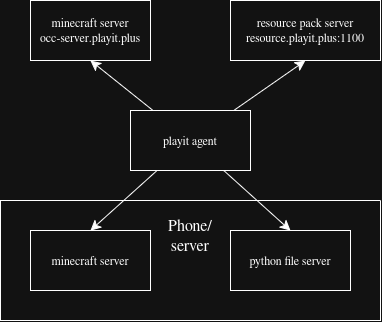
The diagram shows the exact layout: the Android Minecraft host rides the PC's hotspot, while the PC takes the more stable Ethernet uplink into the dorm network.
The “magic” is not the hotspot. It’s replacing the weak segment (dorm Wi‑Fi uplink) with a wired uplink and a short-range Wi‑Fi hop you control (phone <-> PC).
4. Hotspot variants (pick what your gear allows)
| Variant | Topology | Pros | Cons |
|---|---|---|---|
| Ethernet in, Wi‑Fi out (common) | PC gets Internet via Ethernet; shares via hotspot | Simple; usually stable | Still a Wi‑Fi hop (but short-range) |
| Wi‑Fi in, Wi‑Fi out (worst) | PC on dorm Wi‑Fi; also hotspot | Works with no Ethernet | Upstream still unstable; often pointless |
| Travel router/AP (best, if allowed) | Ethernet uplink + your own SSID | Most stable, consistent | Extra hardware; some networks may block |
5. What to test (so we don’t BS ourselves)
Goal: separate likely causes:
A) dorm Wi‑Fi/uplink B) tunnel relay/routing variance C) Android/Termux resource limits D) server config/tick lag
5.1 Server health (local)
On the host:
/tpsand MSPTsparkif installed
If TPS is stable but clients time out: suspect network path more than CPU.
5.2 Jitter (not just average ping)
From a stable machine (PC on Ethernet):
- run continuous pings and watch max / variance
- run tests during “problem moments” (chunk loads, downloads, peak hours)
Interpretation:
- stable average + huge max spikes => jitter/queueing issue
5.3 A/B test the topology
Test the same server with:
- phone directly on dorm Wi‑Fi
- phone via PC-hotspot topology
If hotspot reduces spikes, the upstream Wi‑Fi segment is strongly implicated. (Not a proof of “campus bad”, but it’s actionable evidence.)
5.4 Tunnel routing variance
Tunnels can route via different relays/regions.
If behaviour changes while your local network is unchanged:
- suspect relay/routing variance, not your server.
6. Updated findings (no fake certainty)
What we know:
- Speedtests looked fine (low average ping)
- Gameplay showed periodic upstream spikes on dorm Wi‑Fi
- PC‑hotspot topology reduced instability in practice
What we cannot prove:
- “UTP network is bad” as a general claim
- a single root cause (could be tunnel routing, phone stack, Wi‑Fi, or queueing)
Practical conclusion: Optimise for stable jitter under load, not speedtest numbers.
END